
Add the Social proof block to your product page
Show small round profile photos next to a line of text. Pick your own photos and write a true line.
The Social proof block shows small round photos next to a line of text, like "Davie ✓, Mark ✓ and 1500+ others love our products!". You pick the photos and type the text. The block doesn't count real customers.
Before you start
You need Section Store Plus or its free trial.
Add the block
- In Shopify admin, open Apps → Section Store → Conversion Blocks.
- On the Social proof card, click Edit In Theme.
- Pick your theme. Your live theme has a green dot.
- The theme editor opens on your product template with the block added.
- Drag the block where you want it.
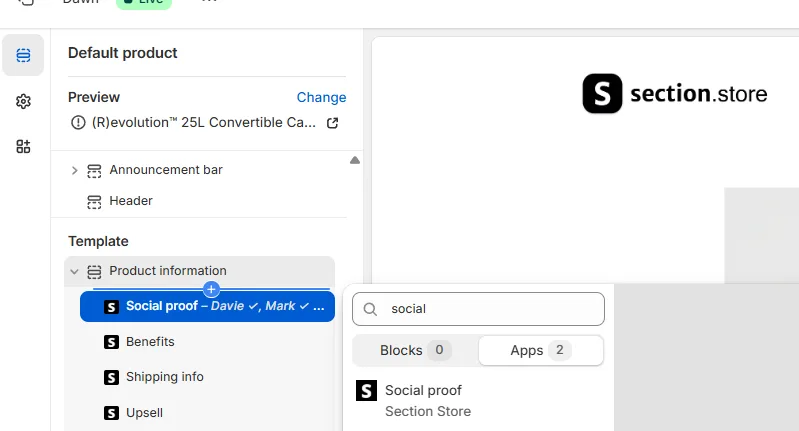
Set it up
- Under Thumbnails, pick images for Profile #1, Profile #2 and Profile #3.
- Keep Use carousel on to rotate five photos, and pick Profile #4 and Profile #5 too. Turn it off to show three fixed photos.
- Under Text, replace the sample line.
- Type ✓ anywhere in the text. It turns into a checkmark.
- Click Save.
Fill every profile. An empty profile shows a sample portrait of someone who isn't your customer, and it changes on each page load.
Other settings
- Thumbnails: Size.
- Text: Size and Text color.
- Checkmark: Size and Color.
- Appearance: Border, Thickness, Roundness and Background.
- Padding: Vertical and Horizontal.
- Extras: Clip to top of wrapper and Custom CSS.
Use it as a header on the Wrapper
Clip to top of wrapper pins the block to the top of the Wrapper box.
- Add the Wrapper block.
- Drag Social proof to be the first item in the wrapped area.
- Turn on Clip to top of wrapper.
- Click Save.
If it doesn't work
- The faces change on each load: a profile is empty. Pick an image for each one.
- It shows 1500+ others: that's sample text. Replace it with your own.
- It doesn't show live visitors or recent purchases: the block has no live counts and no purchase popup. It shows what you type.
Related
- Why do my blocks show sample names, reviews or photos?
- Add a box around your product info with the Wrapper block
- Add the Review summary block (star rating)
Also searched as: social proof, social proof block, avatars, circle avatars, customer photos, customer count, trusted by, 1500+ others, others love our products, profile photos, people viewing, recent purchase, live visitors, fomo
Did this answer your question?