
Add the Benefits block (benefit icons) to your product page
Show up to four benefits with an icon, title and subtitle. Pick Horizontal, Vertical or Boxed.
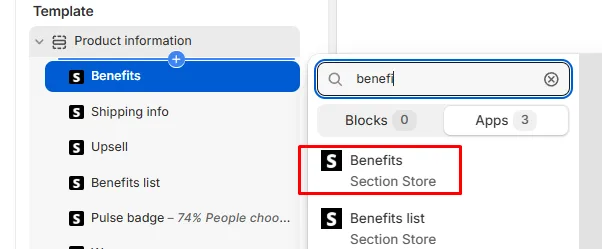
The Benefits block shows up to four benefits, each with an icon, a title and a subtitle. In the theme editor it's called Benefits, not "Benefit icons". For a plain list with check icons, use the Benefits list block.
Before you start
You need Section Store Plus or its free trial.
Add the block
- In Shopify admin, open Apps → Section Store → Conversion Blocks.
- On the Benefits card, click Edit In Theme.
- Pick your theme. Your live theme has a green dot.
- The theme editor opens on your product template with the block added.
- Drag the block where you want it.
Set it up
- Pick a Design: Horizontal, Vertical or Boxed.
- Pick a Row: 2 or 3 benefits side by side. Boxed has no Row setting.
- Set Alignment.
- Under Benefit #1, pick an Icon and write a Title and Subtitle.
- Repeat for Benefit #2 to Benefit #4.
- Click Save.
The samples are "Pay later", "Quality" and "Shipping". Benefit #4 starts empty.
Good to know
- Clear a Title to hide that benefit.
- Boxed has no subtitle.
- Icon has built-in choices like Earth, Heart, Leaf, Box, Shield, Credit Card, Gift, Lock, Sparkle, Rocket, Store and Tag / Sale. Most come in two styles. None shows a placeholder image, not a blank, so pick an icon.
- Custom icon beats Icon for that benefit.
- Four benefits is the limit. For more, add a second Benefits block.
Other settings
- Size & colors: Size, Color and Font weight. They apply to all benefits.
- Appearance: Border, Thickness, Border color, Roundness, Background, Padding vertical and Padding horizontal.
- Custom CSS.
If it doesn't work
- A benefit is missing: its Title is empty.
- The subtitle is missing: Design is Boxed.
- I can't find it: search for "Benefits", not "icons", in the Apps tab.
Related
- Add the Benefits list block (check list of USPs)
- Add the Badges block (pill badges and icons)
- Add a box around your product info with the Wrapper block
Also searched as: benefit icons, benefits block, feature icons, icon boxes, trust icons, icon with text, icon grid, three columns icons, value props, usp icons, upload icon, custom icon, pay later icon
Did this answer your question?