
Add a box around your product info with the Wrapper block
Draw a box with a border, background and shadow around your product info column, with an optional header strip.
The Wrapper block draws a box around your whole product info area. You set its border, background, roundness, shadow and padding. It doesn't hold other blocks. It wraps the area they already sit in.
Before you start
- You need Section Store Plus or its free trial.
- You need an Online Store 2.0 theme. The block detects common layouts, including Dawn-style themes and Horizon.
Add the block
- In Shopify admin, open Apps → Section Store → Conversion Blocks.
- On the Wrapper card, click Edit In Theme.
- Pick your theme. Your live theme has a green dot.
- The theme editor opens in a new tab on your product template, with the block added.
- Change the settings in the right panel.
- Click Save.
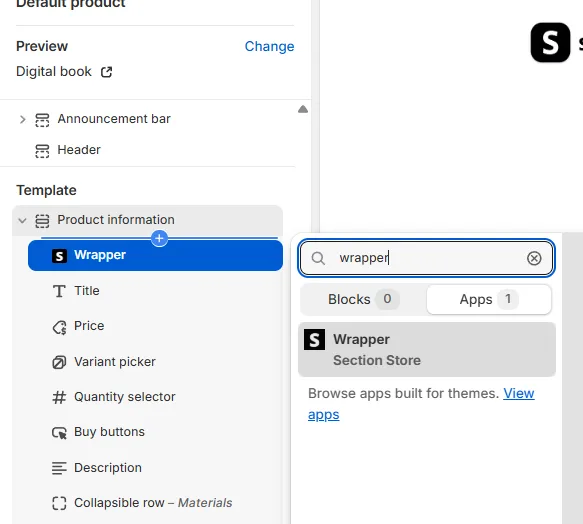
The block takes no space itself, so you see the box and not a new item on the page.
Settings
- Auto detect product info: on by default. It finds your product info area. Turn it off to enter a Custom product info CSS selector.
- Use wrapper on mobile: on by default. Off means the box shows from 768px wide and up.
- Header: Use header adds a strip on top of the box. Set Content, Font size, Background, Text and Alignment. The sample Content is "♥︎ 9 of 10 recommend to friends". You may want less Top padding with a header.
- Appearance: Border, Thickness, Roundness, Background and Shadow (None, small, base, medium, large).
- Padding: Top, Bottom, Left and Right.
- Section background: paints the full product section behind the box.
- Advanced: Custom CSS styles the box.
Good to know
- Other blocks can't go inside it, and you can't drag them into it. Blocks in your product info area appear in the box by themselves.
- Keep the block in your product information section.
- On phones, the left and right padding shrink a little.
- Social proof can sit at the top of the box with Clip to top of wrapper.
Related
- Wrapper block box missing or in the wrong place
- Add the Social proof block to your product page
- Add the Space & divide block
Also searched as: wrapper, wrapper block, wrapper missing, wrapper not showing, box around blocks, box around product info, card behind buy box, container block, group blocks, nest blocks, put blocks inside, cant drag block into wrapper, rounded corners, info box
Did this answer your question?