
Set per-market thresholds on the cart reward bar
Set a different minimum cart amount for each Shopify market, so a threshold stays round in every currency.
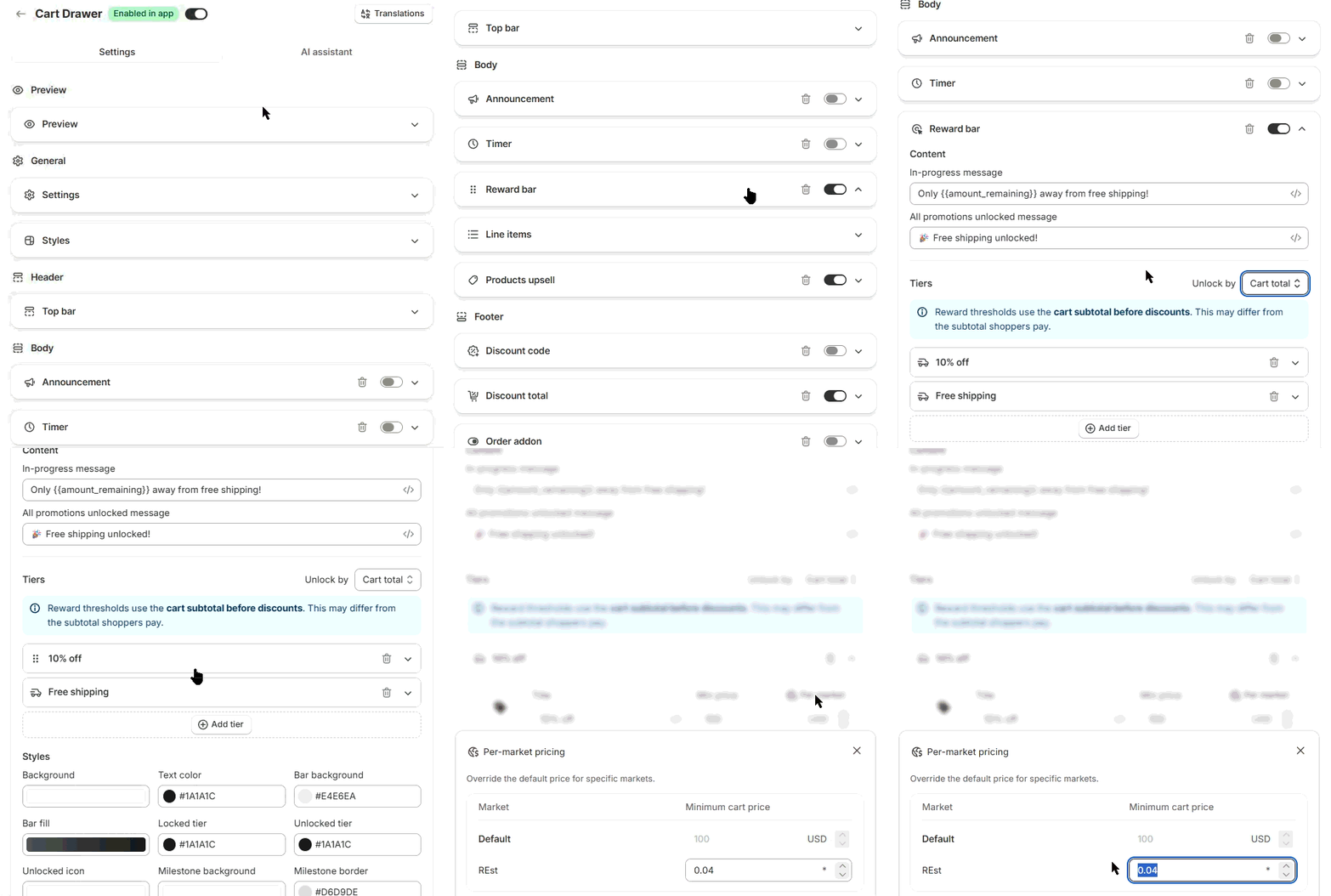
Open a tier in the Reward bar, click Per market and type an amount for each market you want to change. A blank market uses your default amount, converted at Shopify's rate.
Before you start
- Unlock by must be Cart total. The Per market button hides for Item quantity.
- Your store needs more than one market in Shopify.
Set a per-market threshold
- In Shopify admin, open Apps → Section Store → Cart Drawer.
- Click Edit on your cart.
- Under Body, open the Reward bar card.
- Open a tier, for example 10% off.
- Set the default Min price. It is in your store's currency.
- Click Per market. Per-market pricing opens.
- Under Minimum cart price, type an amount for a market. Your primary market shows as Default.
- Leave a market blank to keep the converted default.
- Close the window.
- Click Save.
- Under Preview, open the Preview card and set Preview market to check the bar.
How it works
- Set amounts are in that market's currency. They apply on the bar and at checkout.
- Thresholds use the cart subtotal before discounts by default. That can differ from what the shopper pays. Count cart total after discounts changes this for the bar and free gifts.
- Converted amounts aren't rounded. $50 can show as €46.37. Set a per-market amount for a round number.
- Automatic marks a local-currency market, with a * in the currency column. Your amount applies in each customer's own currency.
- Each tier has its own per-market amounts.
What it can't do
You can change the threshold per market, not the reward. A 10% tier gives 10% in every market. To give free shipping only in some countries, use Specific shipping methods on the tier.
If it doesn't work
- "Markets could not be loaded. Close the modal and try again.": close the window and open it again. If you see an access request, reload the editor and approve it.
- A market shows Currency changed: that market's currency changed after you saved. Enter a new amount or keep the converted default.
- The bar shows the default amount: the shopper's market or currency differs from the one you set. Check the country selector on your storefront.
Related
- Set up free shipping on the cart reward bar
- Limit free shipping to certain shipping methods
- Why does the reward bar show the wrong amount?
- Why are cart prices in the wrong currency?
Also searched as: per market, per-market, different countries, by country, country threshold, market threshold, free shipping by country, different threshold, different currency, currency threshold, local currency, multi currency, shopify markets, markets, international, minimum cart, automatic market, override market, different free shipping per country, free shipping france, free shipping uk, threshold per country, per country threshold, shipping threshold by market, different threshold per market
Did this answer your question?