
Add the Shipping info block (ships-by date and country flag)
Show a ships-by date and a shipping line with the shopper's flag and country code.
The Shipping info block shows a line like "Ships by Thu, Nov 6" and a line like "🇺🇸 Fast US Shipping". The date is today plus the days you set. It doesn't use carrier data, cut-off times or holidays.
Before you start
You need Section Store Plus or its free trial.
Add the block
- In Shopify admin, open Apps → Section Store → Conversion Blocks.
- On the Shipping info card, click Edit In Theme.
- Pick your theme. Your live theme has a green dot.
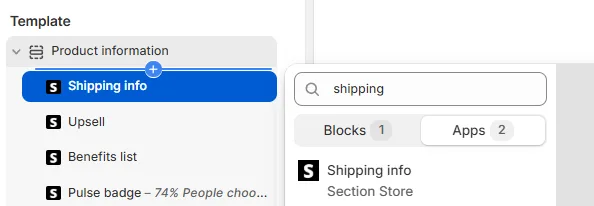
- The theme editor opens on your product template with the block added.
- Drag the block where you want it.
Set the date
- Under Ships by, set Text. The default is "Ships by".
- Set Days after today. The default is 3. Keep a number here, because an empty field breaks the date.
- Set Include weekend. On counts every day. Off skips Saturday and Sunday.
- Click Save.
To show a delivery date, change Text to "Arrives by" and add your usual delivery days.
Set the shipping line
- Under Shipping text customization, edit Text.
- Keep
COUNTRY_FLAGandCOUNTRY_CODEwhere you want the flag and country code. Each works once per line. - To show this line to some countries only:
- Turn off Allow all countries.
- In Allowed countries ISO code, enter codes with commas, like US,CH,DE.
- Set Text for rest countries for everyone else.
- Click Save.
How it works
- The date comes from the shopper's device.
- We write the date in the storefront language.
- The country comes from Shopify's guess of the visitor's location. If that's missing, we use the storefront's country.
Other settings
- Icon: Use dot, Custom icon, Color and Size. With Use dot off and no image, no icon shows.
- Ships by: Font size and Color.
- Shipping text customization: Color. This line has no size setting.
- Appearance: Border, Thickness, Color, Roundness and Background.
- Padding: Vertical and Horizontal.
- Custom CSS.
If it doesn't work
- The date looks wrong: check Days after today and Include weekend.
- The date says Invalid Date: Days after today is empty. Enter a number.
- The flag is wrong: VPNs and some networks confuse Shopify's location guess.
Related
Also searched as: shipping info, shipping block, ships by date, delivery date, delivery estimate, estimated delivery, arrives by, get it by, country flag, fast shipping, shipping estimate, shipping text, dispatch time, handling time
Did this answer your question?